For most of passport-photo history, "digital editing" meant someone cloning out a shadow in Photoshop. In 2026, it means something much bigger: phones that auto-smooth skin by default, apps that can generate a photorealistic headshot from a text prompt, and fraud rings that can produce a synthetic face convincing enough to fool both a human examiner and a facial-recognition system. Both sides of that coin — accidental AI edits and deliberate AI fraud — are now hitting official photo ID systems at the same time.
This guide covers all of it: the new detection rules, why your camera might be quietly disqualifying you, the bigger identity-fraud trend behind the crackdown, and exactly how to take a photo that's real, compliant, and rejection-proof.
The New 2026 Rule: Governments Are Now Actively Screening for AI
The U.S. State Department's photo guidance has said "no filters, no AI" for years. What changed in 2026 is enforcement. The official guidance now states, in plain language:
> "Do not change your photo using computer software, phone apps or filters, or artificial intelligence... We check all photos to ensure you are not using artificial intelligence tools."
> — U.S. State Department, Passport Photos
The State Department's own example gallery now includes a photo captioned: "While the image may appear acceptable, it was created using an artificial intelligence tool... Take a new photo without making digital changes or enhancements." That's a real screenshot from their official page — a photo that looks completely normal to a human eye, flagged and rejected purely because it was AI-generated.
The UK's HM Passport Office has near-identical language: digital photos must be "unaltered by computer software", with no filters, beauty modes, or AI clean-up tools accepted. The examiner standards explicitly bar filters that "add textures or special effects" or change the shape of facial features, while allowing only basic brightness/contrast adjustment.
AI Is a Continuum, Not a Light Switch
It's tempting to treat "AI" as one thing that's either banned or allowed. In practice there's a real difference between two categories that keep getting lumped together:
Classical / segmentation-based processing. Cropping, resizing, and background segmentation — cleanly separating a person from their existing background and placing them on a plain one — have been standard parts of photo processing for well over a decade, long before "generative AI" was a phrase anyone used. Passport photo booths, drugstore kiosks, and compliance services have quietly done background cleanup this way for years, and it's generally been tolerated because the model isn't inventing anything new — it's classifying which existing pixels are "you" and which are background, then compositing. Several AI passport-photo tools on the market today go a step further and also auto-correct brightness or lighting to smooth out shadows — a feature they advertise directly, and one more data point that a lot of "AI" in this space is applied technical correction rather than generative alteration.
Generative AI. Diffusion models and other image generators can synthesize entirely new pixel detail: smoothing skin by inventing plausible-looking texture, "outpainting" a background from scratch, reshaping a jawline, or producing a photorealistic face from a text prompt with no real photo behind it at all. This is the genuinely new capability — cheap, fast, and convincing enough to fool a casual glance — and it's this category the 2026 enforcement wave is built to catch. As one compliance-focused outlet put it, the new detection model looks specifically for "the telltale signatures of generative AI: edge artifacts where a subject was cut from one background and pasted onto another; unnaturally smooth skin; pixel statistics that don't match a single-exposure camera capture" — not simply "was any software involved at all."
The tempting part is that these tools are genuinely good at making you look better — a few years younger, blemishes gone, features subtly rebalanced into something a bit more symmetrical or glamorous. That's exactly why they're a trap here: an official photo ID isn't supposed to be your best-looking photo, it's supposed to be an accurate one. A passport photo that's flattering but doesn't quite match your face is a liability at every border and check-in counter for the next 5–10 years, not a win. Resist the temptation to run your photo through a "make me look better" filter before you submit it — it's the single easiest way to turn a compliant photo into a rejected one.
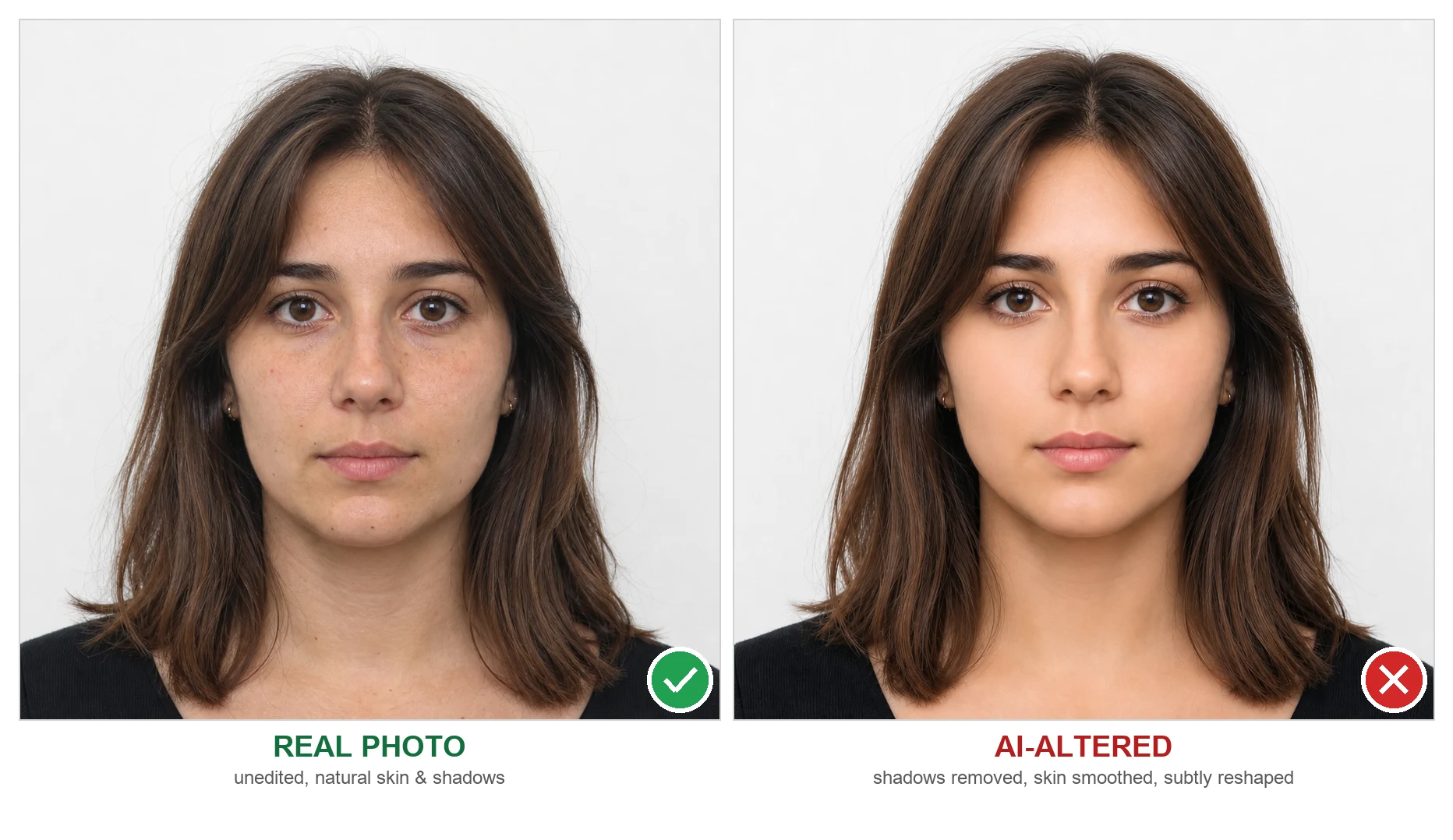
The photo on the right isn't a different, more attractive person — it's the same photo with shadows removed, skin smoothed to near-flawlessness, and features subtly softened toward "conventionally attractive." It looks great. It also no longer matches the applicant closely enough to be trusted as an identity document, which is exactly the kind of alteration detection models are built to catch.
That distinction matters for us directly. Our own pipeline uses custom segmentation-based models tailored for portraits — the same broad family as open-source tools like BiRefNet or rembg — to separate you from your existing background, plus a geometric head-straightening step that detects head tilt and rotates the image to level it out. Several other passport-photo tools on the market advertise the same kind of auto-rotation/straightening as a headline feature — it's a common, deterministic correction in this category, not something unique to us. Both segmentation and rotation are measurable operations applied to your real photo; neither hallucinates skin texture, reshapes your face, or generates a background from a text prompt. It's the "classical" category, automating jobs photo booths have done for years, not the generative one. That's a meaningfully different thing from a diffusion-based "AI enhance" button.
There's a third layer worth naming, too: modern phone cameras run AI at the hardware level for essentially every photo, whether you touch a single setting or not. Multi-frame HDR stacking, ML-based noise reduction, autofocus and face detection, and tone-mapping all happen automatically in the base camera pipeline — that's simply how phone cameras have worked for years now. The "no AI" bus left the building for baseline capture a long time ago, and passport authorities implicitly accept it: an ordinary photo straight off a stock iPhone or Android camera is generally fine. What the rules actually target is the layer on top of that baseline — optional, more aggressive features (Portrait mode's synthetic bokeh, Beauty mode's face-altering smoothing, one-tap "AI enhance") and outright generative edits, not the invisible computational photography every phone already does by default.
Why This Catches Honest People: Your Phone Is Already Editing You
Here's the uncomfortable part — most people flagged for "AI editing" aren't cheating. They're using a modern smartphone the way it was designed to be used.
Default camera behaviors on modern phones frequently apply automatic processing that leaves detectable traces:
| Feature | What it does | Why it's a problem |
|---|---|---|
| Portrait Mode / Smart HDR | Blends multiple exposures, smooths skin, adjusts lighting | Produces "computational" pixel patterns that don't match a single-exposure capture |
| Beauty Mode / Face Retouch (many Android/Chinese OEM cameras) | Softens skin, slims face, brightens eyes — often on by default | Directly alters your natural appearance, which is exactly what's prohibited |
| AI Background Blur/Replace (diffusion-based "magic eraser" / generative fill) | Invents new background pixels around you, often blending or outpainting rather than cleanly segmenting | Leaves generative edge artifacts and texture that don't match a real single-exposure photo — different from a clean segmentation-based swap |
| Auto-enhance in Google Photos / iOS edits | One-tap "enhance" applies AI-driven color, sharpness, and lighting correction after the fact | Even a single tap counts as "digital change" under the rules |
| Screenshotting or re-photographing a printed/edited photo | Captures a copy of a copy | Introduces compression and moiré artifacts that read as manipulation |
None of this requires bad intent. It just requires a phone doing what phones now do by default. That's precisely why detection systems (ours included) don't ask "did you mean to cheat?" — they just look for the fingerprints AI processing leaves behind, like unnaturally uniform skin texture, mismatched noise patterns, or a background that's too perfectly clean to be a real wall.
The Bigger Picture: AI Identity Fraud Is Exploding
The crackdown on AI-edited photos isn't happening in isolation — it's a defensive reaction to a much larger trend. Identity-verification firm Shufti's 2026 Identity Fraud Index projects deepfake-enabled identity fraud will grow 495% year-over-year in 2026, with one category standing out: document deepfakes — AI-produced ID documents and photos submitted as genuine — are projected to grow roughly 3,900% over 2025 levels.
The specific attack researchers are most worried about for passports is face morphing: blending two people's faces into a single photo that's convincing enough to pass both a human examiner and facial-recognition matching. A morphed passport photo can, in theory, be used by two different people — which is why NIST (the U.S. National Institute of Standards and Technology) runs an ongoing Face Analysis Technology Evaluation (FATE) program specifically benchmarking morph-attack detection, and the EU has funded multiple Horizon Europe research projects (EINSTEIN, SafeTravellers) dedicated to catching AI-generated morphs at the border.
The tooling for this kind of fraud has also gotten cheap. Security researchers at Group-IB and identity-fraud analysts at Proof have documented deepfake image-generation services selling for $10–$50 and synthetic identity kits for as little as $15 — a far cry from the specialized skills fraud used to require.
This is the context for why passport agencies moved from "please don't edit your photo" to "we algorithmically check every submission." It's not bureaucratic overreach — it's a proportional response to a genuinely fast-moving threat, and honest applicants are collateral damage of a net that has to be cast wide.
How Detection Actually Works
On the government side, the pattern is consistent: an automated model runs first, looking specifically for generative signatures — skin texture that's statistically too smooth or too uniform, noise/compression patterns inconsistent with a single-exposure camera capture, outpainted background regions, or a face that doesn't match expected biometric geometry. A clean, well-executed background segmentation doesn't automatically trip these checks the way a diffusion-generated background does; it's the hallucinated pixel detail the models are tuned to spot. Only photos the algorithm can't confidently clear get escalated to a human reviewer.
We built a version of this same idea into our own processing pipeline. Our free passport photo checker runs fast, rule-based checks (AWS Rekognition — sizing, head position, background, brightness, sharpness, and more) to catch the most common rejection reasons instantly. When you purchase a photo, we layer in a vision-model check (Claude/GPT) to flag heavy editing, obvious filters, or artificial-looking alterations — the same category of check governments are now running, applied earlier in the process so you find out before you submit, not after. You can read the full breakdown of what we check on our support & FAQ page.
The practical implication for you: don't try to guess whether an edit is "subtle enough" to pass. If a tool touched your face, skin, or background beyond a straight crop, treat it as disqualifying and start from a clean, unedited photo instead.
Practical Guide: Taking a Compliant Photo Without Generative AI in 2026
- Turn off the optional AI features — you can't (and don't need to) eliminate all of it. Baseline computational photography (HDR stacking, autofocus, noise reduction) is unavoidable on modern phones and is implicitly fine. What you're switching off is the optional layer on top: on iPhone, avoid Portrait mode and Photographic Styles for this shot — use the plain default photo mode. On Android, look for "Beauty," "AI enhance," "Face retouch," or "Smart scene" toggles in the camera app and switch them off.
- Shoot against a real plain white or off-white wall or sheet. Don't use a virtual/AI background — that's an instant "digital change" flag, and it visibly looks different from a real wall (too flat, too perfectly even lighting).
- Use natural, even lighting. Face a window with diffuse daylight, or stand a few feet from a plain wall with a light source in front of you rather than behind. This avoids the harsh shadows that tempt people into "fixing" them digitally afterward.
- Don't touch the file afterward. No auto-enhance, no one-tap "retouch," no red-eye removal tool, no background blur. If red-eye happened, retake the photo — don't edit it out.
- Crop and resize only — nothing else. Cropping to the required dimensions (2×2 in / 51×51mm for the US) and resizing to the required pixel count is explicitly allowed everywhere we checked. Anything beyond that (skin, background, lighting correction as opposed to a plain crop) risks rejection.
- Run it through a compliance checker before you submit or print. Our free passport photo checker verifies sizing, head position, and background — for the US and dozens of other countries — before you spend money printing or submitting. (The digital-editing/AI check itself runs when you purchase — see below.)
- When in doubt, get a fresh photo, not a fixed one. Every official source we found agrees on this: a new, unedited photo beats a "corrected" old one every time. Editing to fix a problem is itself the violation.
What to Do If Your Photo Was Already Rejected for "AI Editing"
If you got a rejection notice citing digital alteration or AI use, don't try to "fix" the same photo again — start over with a brand-new, unedited photo following the steps above. If you genuinely didn't edit anything and still got flagged, the most common culprit is a camera feature you didn't know was on (Smart HDR, Portrait mode, or an OEM beauty filter) — check your camera settings before your next attempt, not just your photo-editing habits.
FAQ: AI and Passport Photos
Can I use an AI app to generate my passport photo from a selfie?
No. Any photo that was created or modified by an AI tool — including "AI passport photo generator" apps, background-replacement tools, or beauty filters — will be rejected. Passport authorities require an original, unedited photograph of you.
Will my phone's default camera settings get my photo rejected?
They can. Features like Portrait mode, Smart HDR, and automatic "Beauty" or "AI enhance" modes apply real-time processing that counts as digital alteration. Turn these off before taking your photo.
Is cropping or resizing my photo considered "AI editing"?
No. Cropping to the required dimensions and resizing to the required pixel count is explicitly permitted by every passport authority we reviewed. The restriction is on changes that alter your appearance — background swaps, skin smoothing, lighting correction — not basic formatting.
How do passport agencies actually detect AI-edited photos?
Automated systems look for patterns AI processing leaves behind: unnaturally smooth or uniform skin texture, edge artifacts where a background was replaced, and pixel/noise statistics inconsistent with a single, unedited camera exposure. Photos the algorithm can't confidently clear are sent to a human reviewer.
Does PassportPhotoFactory use AI to edit my photo?
We use custom segmentation-based models tailored for portraits (the same broad family as open-source tools like BiRefNet or rembg) to separate you from your existing background, a geometric head-straightening step to correct head tilt, and rule-based checks (AWS Rekognition, in our free checker). When you purchase a photo, we also run vision-model checks (Claude/GPT) to catch compliance issues and editing artifacts. We don't use generative AI to invent skin texture, reshape your face, or synthesize a background from scratch. The photo you submit is the photo that gets formatted — we just make sure it meets the official spec.
Sources: U.S. State Department — Passport Photos, UK GOV.UK — Photos for Passports, NIST FATE MORPH, Shufti Identity Fraud Index 2026 (via ASIS International), Group-IB / Proof fraud research.